
One app for your
entire household
Calendar, tasks, shopping lists, meal planning, budget tracking & notes — all connected in one place. Stop juggling apps, start organizing together.
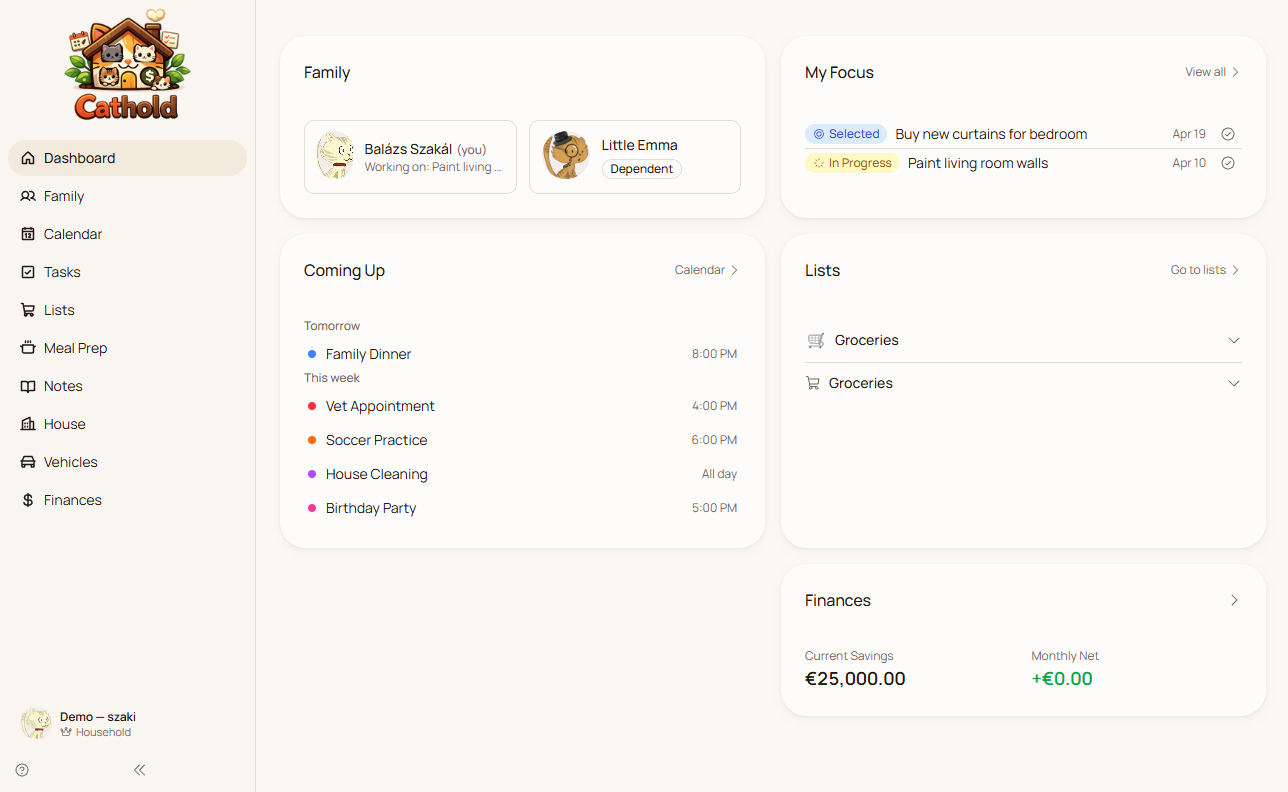
One app replaces six
Your family is probably paying for 5–6 separate apps that don't talk to each other. Cathold connects everything.
Family Calendar
Cozi, TimeTree
Task Manager
Todoist, Asana
Shopping Lists
AnyList, OurGroceries
Meal Planner
Mealime, Paprika
Budget Tracker
YNAB, Goodbudget
Shared Notes
Notion, Apple Notes
6 separate apps
$37+/mo
Cathold — all in one
$7.99/mo
Everything your household needs
Ten connected modules that work together — from daily tasks to long-term finances. See it in action.
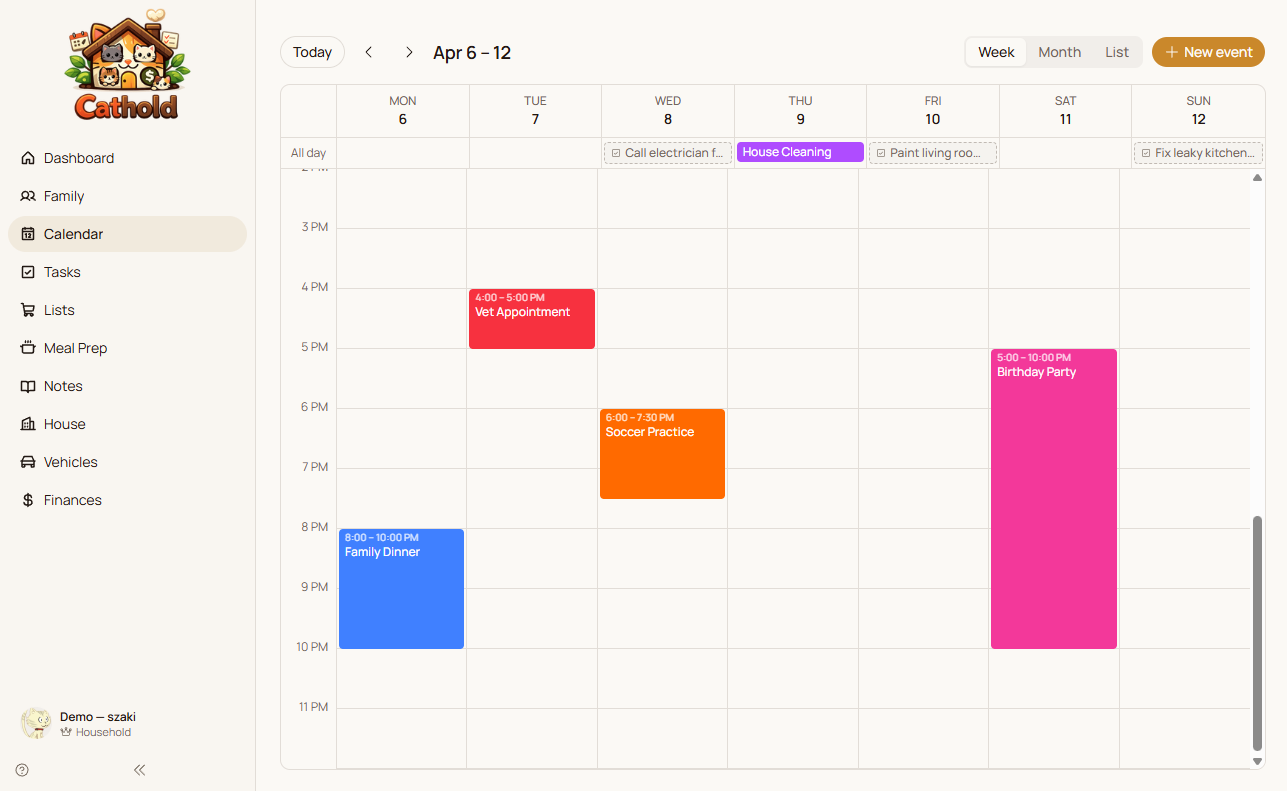
Never miss a moment
Color-coded week and month views for your whole family. See who's where at a glance, track school events, appointments, and activities. Syncs to your phone calendar via ICS feed.
Learn more →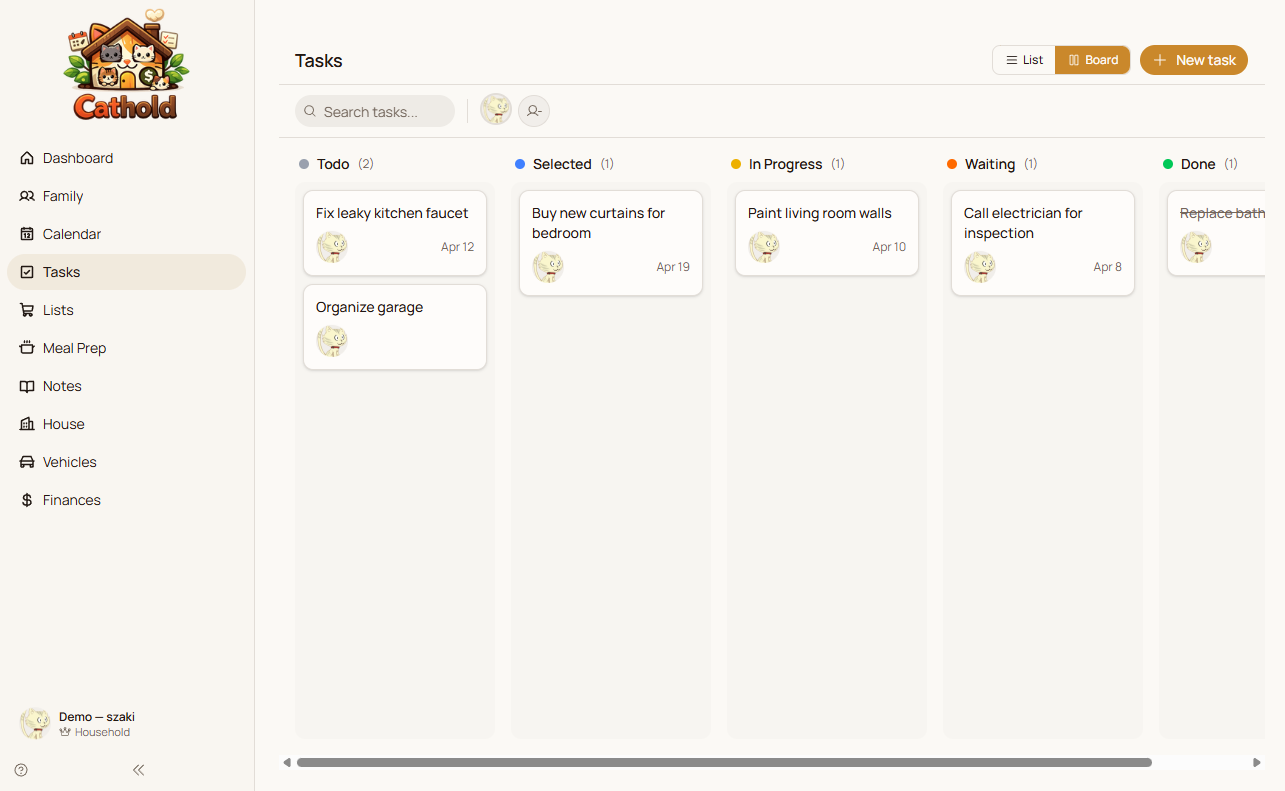
Get things done together
List and kanban board views. Assign tasks to family members, track progress, and watch things move from "to do" to "done." Works as a simple list on mobile.
Learn more →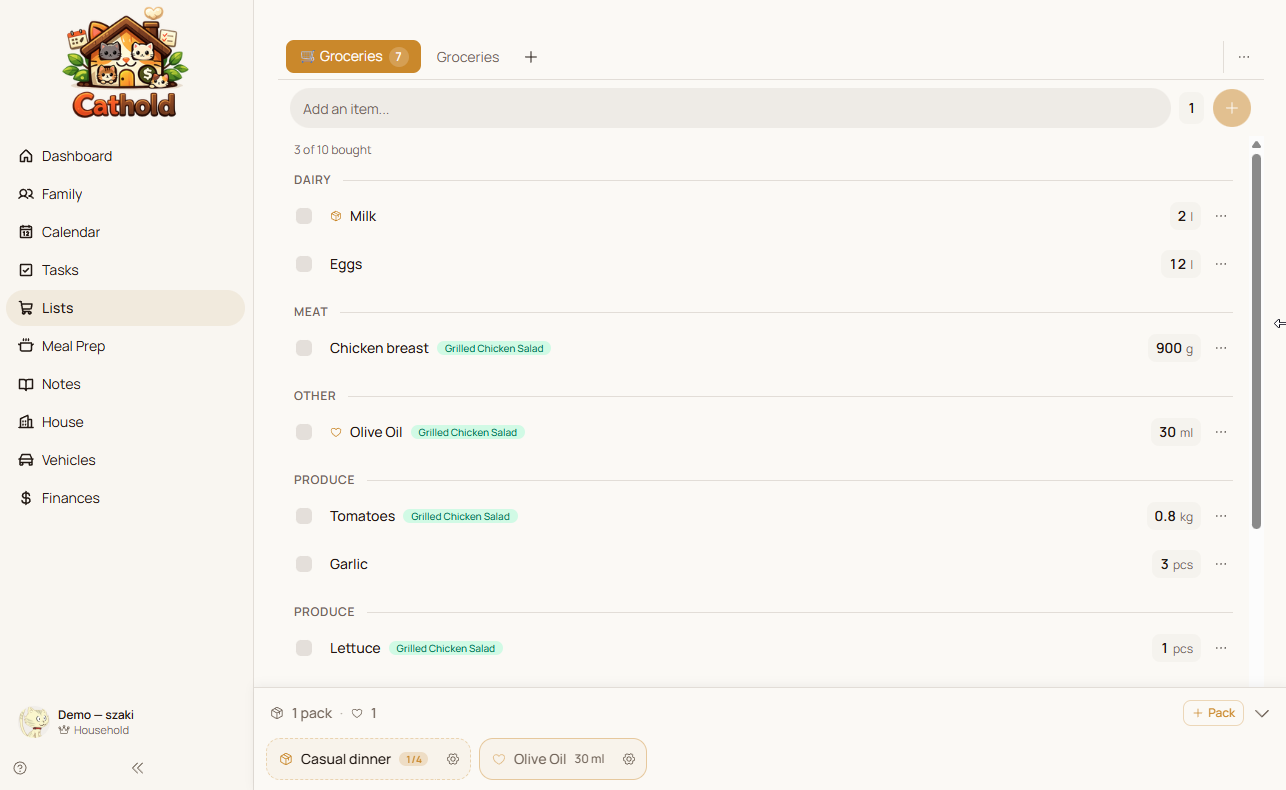
Shop smarter, together
Real-time collaborative lists. Check items off as you shop, see what's needed instantly. Build a catalog of your usual items for one-tap re-adding.
Learn more →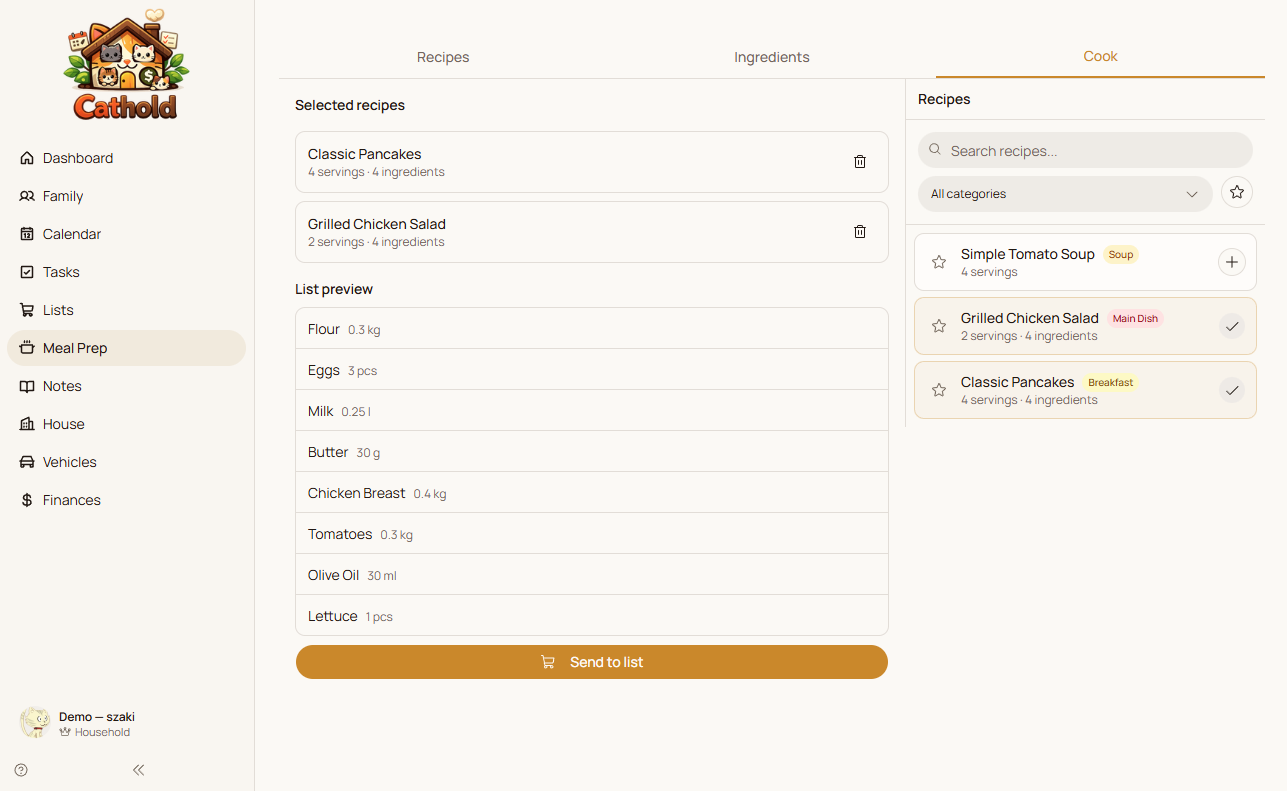
Plan meals, skip the stress
Build a family recipe library with ingredients and cost estimates. One tap sends ingredients to your shopping list. Plan your week's meals and know exactly what to buy.
Learn more →Up and running in minutes
No complicated setup. No migration headaches. Just sign up and go.
Sign up in 30 seconds
Create your family with one click. No credit card, no lengthy forms. Your 7-day free trial starts instantly.
Invite your family
Share a link and everyone joins with their own cat avatar. Set permissions so kids see what they need.
Start organizing together
Add events, assign tasks, build shopping lists, plan meals. Everything syncs in real time across all devices.
Built for every kind of home
Whether you're a couple or a household of eight, Cathold adapts to how you live.
Growing Families
“Monday morning: Sarah checks the week's meal plan, sends missing ingredients to the shopping list. Mark picks them up after work — he sees the list update in real time. The kids check their task board for chores. Everyone knows what's for dinner.”
- Shared calendar for school, sports & appointments
- Meal plan → shopping list in one tap
- Kid-friendly task assignments
Busy Households
“The Garcias manage a 6-person household with two cars, a renovation, and a monthly budget to track. Everything lives in Cathold — the plumber is on the calendar, the bathroom tiles are in Notes, and the car service alert saves them from a missed oil change.”
- Vehicle maintenance tracking & alerts
- House planner for rooms & renovations
- Family budget with monthly projections
Couples
“Alex and Jamie split cooking duties. This week it's Jamie's turn to plan meals — three recipes chosen, ingredients sent to the shared list. Alex picks up groceries on the way home. Sunday evening, they review the budget dashboard together.”
- Shared shopping lists & recipes
- Simple budget tracking for two
- Synced calendar for date nights & deadlines
Roommates
“Four friends, one house, zero drama. The task board rotates cleaning duties. Shopping lists track who needs what. Shared notes hold the WiFi password, landlord contact, and the recycling schedule nobody can remember.”
- Fair task rotation with assignments
- Shared notes for house info
- Separate shopping lists per person or shared
Pick your plan
Start free for 7 days. No credit card required. Pick the plan that fits your household.
Lifetime Household — Early Bird
Pay once, get Household forever. Limited to 100 families. All future features included.
$199.00one-time
Family
For families getting organized
- 1 family, up to 4 members
- 30 note pages
- Full calendar with ICS sync
- 5 lists (shopping, packing, anything)
- Meal planning (10 recipes)
- 30 active tasks (list + kanban)
- Full dashboard
- Recipe export
Household
Full power for the whole household
- Up to 3 families, unlimited members
- Unlimited notes
- Full calendar with ICS sync
- Unlimited lists
- Unlimited recipes + marketplace publishing
- Unlimited tasks (list + kanban)
- Full dashboard
- Permission system
- House planner
- Finance tracking
- Vehicle management
- Recipe export
Why families trust Cathold
Simple, secure, and genuinely useful — not another corporate project manager with a family skin.
Your data stays yours
Your family's data is fully isolated and encrypted at rest and in transit. We never share or sell your information.
Works on every device
Responsive web app that works on desktop, tablet, and phone. Install it as a PWA for native-like experience.
Real-time sync
Changes appear instantly for your whole family. Edit a shopping list while someone else is at the store — they see it immediately.
Built by a family, for families
Cathold started because we needed it ourselves. Every feature is battle-tested in our own household before it reaches yours.
We're a small family building the tool we wished existed. Every feature is something we actually use — and the cat avatars make our kids excited to check their chores.
Frequently asked questions
Everything you need to know about Cathold.
What is Cathold?
Cathold is a household management app that replaces six or more separate family apps with one connected platform. It combines a shared family calendar, task manager with list and kanban views, collaborative shopping lists, a meal planner with recipe cost tracking, a household budget with financial projections, shared notes with a Notion-like editor, vehicle maintenance tracking, house management tools, and family profiles with document and medical history storage. Every module works together — plan a meal and send ingredients to your shopping list in one tap, or create a vehicle service reminder that automatically appears on your family calendar. Everyone in the family gets their own customizable cat avatar.
How does the free trial work?
Sign up with Google and get 7 days of full, unrestricted access to every feature in Cathold — no credit card required. During the trial, you can explore all 10 modules, invite your family members, set up your household calendar, create shopping lists, plan meals, track your budget, and organize tasks. Your family members also get full access during the trial period. If you love it, pick a plan — Family at $7.99/month for up to 4 members, or Household at $14.99/month for unlimited members and all modules. If it's not for you, no worries — there's nothing to cancel.
What apps does Cathold replace?
Cathold covers what most families use five to six separate apps for: a family calendar like Cozi or TimeTree for scheduling, a task manager like Todoist or Any.do for to-dos, shopping lists like AnyList or OurGroceries for groceries, a meal planner like Mealime or Paprika for recipes and weekly menus, a budget tracker like YNAB or Goodbudget for household finances, and shared notes like Notion or Google Keep for family information. The key difference is that everything in Cathold is connected — your meal plan generates shopping list items, your vehicle maintenance creates calendar events, and your budget tracks spending across all categories in real time.
How many family members can I add?
The Family plan supports up to 4 members, which works well for most families. The Household plan removes all limits — invite your whole extended family, roommates, or anyone who helps manage your home. Each person gets their own cat avatar that they can customize with different body styles, fur colors, eye shapes, and accessories. Family admins can also set individual permissions per module, so you can give some members view-only access to finances while letting them fully edit shopping lists and meal plans.
Is my data secure?
Absolutely. Your family's data is completely isolated from other families through row-level security policies enforced at the database level. All data is encrypted both in transit using TLS and at rest in the database. We never share, sell, or use your family's information for advertising or training purposes. Cathold uses Supabase as its infrastructure provider, which runs on top of AWS with enterprise-grade security practices including regular audits and SOC 2 compliance. You can also control who in your family sees what through per-module permission settings.
Can I use Cathold on my phone?
Cathold is a responsive web app that works on any device with a modern browser — phones, tablets, laptops, and desktops. You can install it as a Progressive Web App (PWA) on your phone for a native-like experience with its own app icon on your home screen, push notifications, and offline access to cached data. The interface automatically adapts to smaller screens: the sidebar becomes a drawer, task kanban boards switch to list view on mobile, and note editing uses a full-screen overlay for comfortable typing. No app store download required — just visit cathold.app and tap "Add to Home Screen."
What happens when my trial ends?
When your 7-day trial ends, you'll be prompted to choose a plan to continue using Cathold. Your data stays completely safe — nothing gets deleted, and all your family's calendar events, tasks, shopping lists, recipes, budget entries, and notes remain exactly as you left them. You just need an active subscription to access the app again. If you need more time to decide, reach out to us — we're happy to help. Once you subscribe, everything picks up right where you left off with no data loss or re-setup needed.
Can I switch plans later?
Yes, you can upgrade or downgrade your plan at any time from within the app. When you upgrade from Family to Household, you get immediate access to all additional modules (finances, vehicles, and house management) and the ability to add unlimited family members. When downgrading, you keep full access to your current plan's features until your billing period ends, then transition to the lower tier. There is also a Lifetime Household option for $199 as a one-time payment — this gives you every Household feature forever with no recurring charges.
How much does Cathold cost?
Cathold offers three pricing options. The Family plan costs $7.99 per month and includes up to 4 family members, 7 core modules (calendar, tasks, shopping lists, meals, notes, family profiles, and dashboard), and up to 5 shopping lists. The Household plan costs $14.99 per month and unlocks everything — unlimited family members, all 10 modules including finances, vehicles, and house management, plus unlimited lists and storage. For those who prefer a one-time purchase, the Lifetime Household plan is $199 and includes every Household feature forever. All plans start with a free 7-day trial, no credit card required.
Does Cathold work with other calendar apps?
Yes. Cathold provides an ICS calendar feed URL that you can subscribe to from any calendar app — Google Calendar, Apple Calendar, Outlook, or any other app that supports ICS feeds. This creates a read-only view of your Cathold family calendar events in your preferred calendar app, so you can see everything in one place. Events sync automatically whenever your calendar app refreshes the feed. Inside Cathold, you get the full experience with color-coded events, vehicle tracking, and integrated task due dates on the calendar.
Your family's apps, unified
Calendar, tasks, shopping, meals, budget, and notes — all connected, all in sync, all in one place. Start free for 7 days, no credit card needed.