
Feature
Household Tasks, Managed Like a Pro
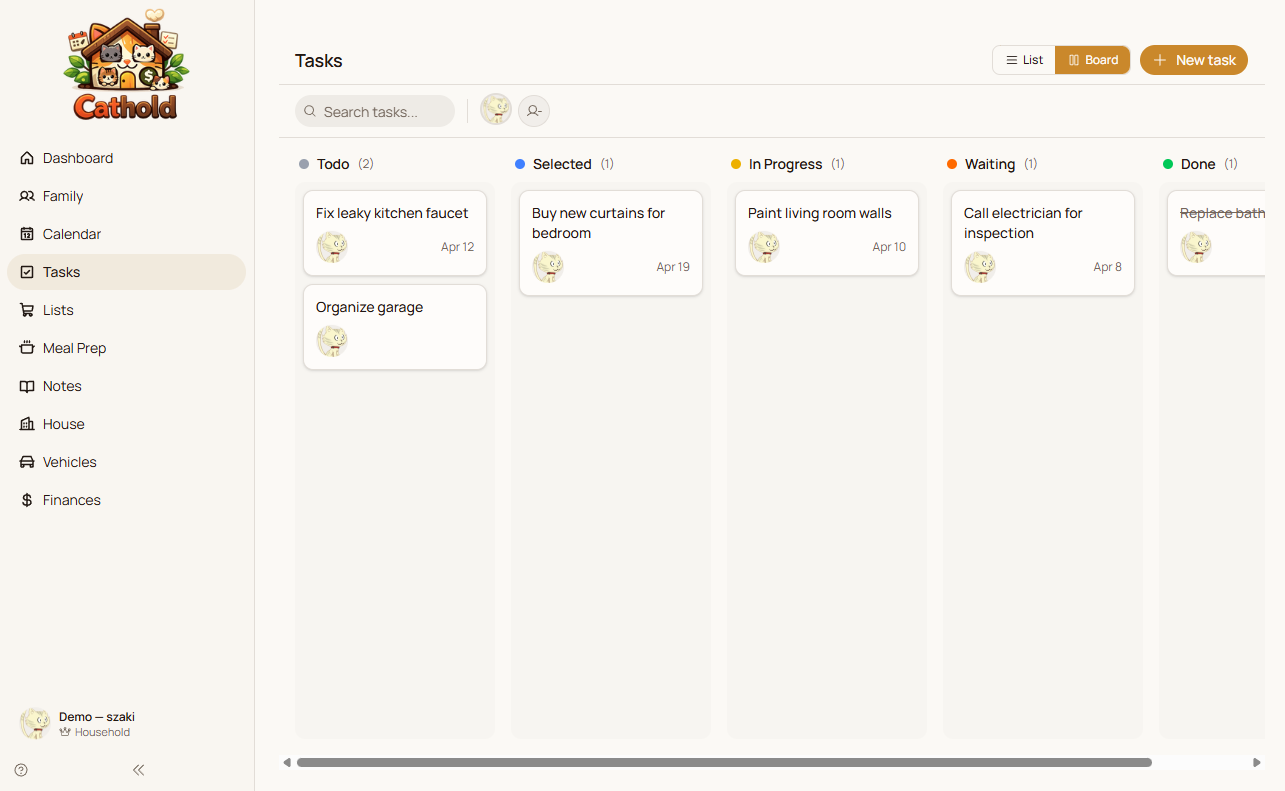
From daily chores to renovation projects, Cathold gives your family a shared task board with kanban and list views, five statuses, rich descriptions, and due dates that sync to the family calendar.
Try Family Tasks free for 7 days
No credit card required.
What makes it great
Five Task Statuses
Move tasks through backlog, to-do, in progress, review, and done. More nuanced than a checkbox, this system lets you track complex household projects with clarity.
Kanban Board with Drag-and-Drop
Visualize your family's tasks on a kanban board. Drag tasks between columns to update their status. The board auto-falls back to a list view on mobile for easy one-handed use.
Rich Task Descriptions
Add detailed descriptions to tasks using the block editor. Include steps, links, and notes so whoever picks up the task knows exactly what to do.
Calendar Integration
Tasks with due dates appear on the family calendar alongside events. See everything your family needs to do in one unified view.
Assignees for Accountability
Assign tasks to specific family members so everyone knows who is responsible. Transparency reduces the mental load and prevents tasks from falling through the cracks.
Vehicle Task Creation
The vehicles module can create maintenance tasks that appear on the task board. Service reminders flow into your task workflow automatically.
Perfect for
- Create a family chore chart with assigned responsibilities
- Manage a home renovation project with a kanban board
- Track recurring household maintenance tasks with due dates
- Coordinate a family move with dozens of tasks and assignees
Frequently asked questions
Does the kanban board work on mobile?
Yes. On mobile devices, the kanban board automatically falls back to a list view for easier navigation. You can still change task statuses with a tap.
Can I create recurring tasks?
You can create tasks with due dates for recurring chores. The task system integrates with the calendar so you see upcoming household work alongside family events.
How do vehicle tasks work?
When you track a vehicle in Cathold, you can create maintenance tasks from the vehicle module. These tasks appear on the shared task board and calendar like any other task.
What is the difference between kanban and list view?
Kanban shows tasks in columns by status, ideal for visual thinkers and project tracking. List view shows all tasks in a flat list with status indicators, which is simpler and works better on small screens.
Ready to get started?
Try Cathold free for 7 days. Family Tasks is just one of 10 integrated modules that make household management effortless.